How Code Review Helps Teams Improve Code Quality
Code Review Solutions
Recently, I’ve been promoting code review in my company. After several days of research, I’ve compiled some problems and solutions.
Current Problems
- No good tool for convenient code review
- No good code standards for code review
- No enforced process for code review
- No dedicated person responsible for code review
- Tracking changes after code review
- Incentive mechanism for reviewers and fixers
- Cross-team resource allocation can lead to excessive code
Solutions
Integrate Merge Request Workflow
To do code review on GitLab, we need to add Merge Request to our existing Git workflow.
How It Works
Merge Request can be used with Feature Branch Workflow, Gitflow Workflow, or Forking Workflow. The process is:
- Developers create a dedicated branch in the local repository to develop features.
- Developers push branch changes to the public Git repository.
- Developers initiate a Merge Request through Git.
- Other team members review the code, discuss, and make changes.
- The project maintainer merges the feature into the official repository and closes the Merge Request.
Integrating with Our Current Workflow
Our current code management workflow is: Gitflow Workflow
Gitflow Workflow is similar to Feature Branch Workflow but defines a strict branching model around project releases.
Using Merge Request in Gitflow Workflow gives developers a convenient place to discuss issues related to release or maintenance branches.
How Merge Request works in Gitflow Workflow: When a feature, release, or hotfix branch needs review, developers simply initiate a Merge Request, and other team members get notified through Bitbucket.
New features are generally merged into the develop branch, while releases and hotfixes need to be merged into both develop and master branches. Merge Request can be used as the formal management for all merges.
Review Process
start=>start: Developer clones code via git
end=>end: End code review
modify=>operation: Modify and commit code
pr=>operation: Initiate Merge Request
notify=>operation: GitLab notifies reviewers
review=>operation: Reviewers start reviewing
close=>operation: Close Merge Request
merge=>operation: Merge code
approved=>condition: Approved?

start->modify->pr->notify->review->approved
close->merge->end
approved(yes)->close
approved(no)->modify
Code Review with GitLab
Project Roles
| Role | Description |
|---|---|
| Owner | Git system administrator |
| Master | Git project developer |
| Reporter | Git project tester |
| Guest | Visitor |
Role Permissions
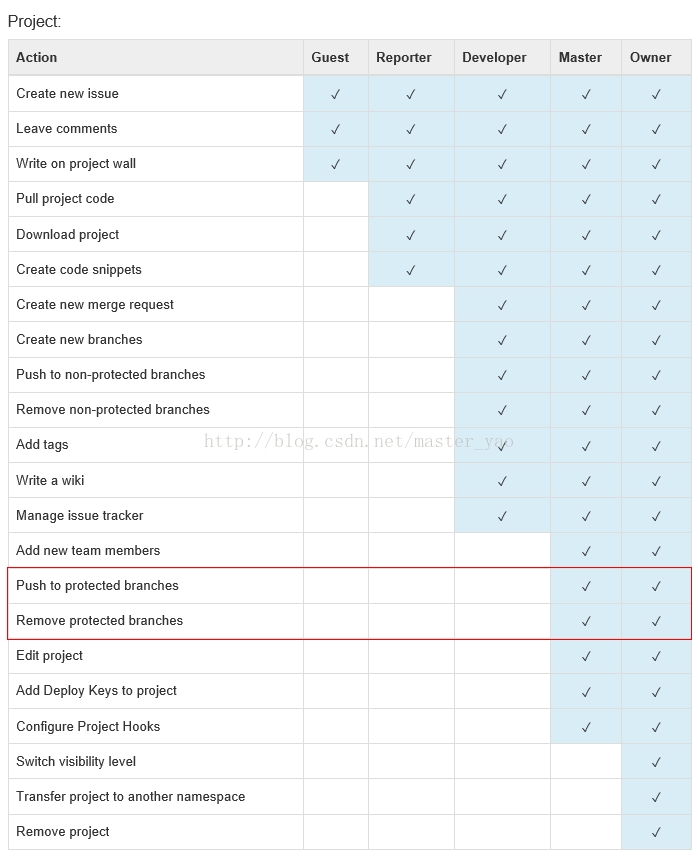
Only Master and Owner have the right to merge code into protected branches. Role assignment for Master needs to be handled carefully.
Protected Branches
- bugfix_*
- develop_*
- release_*
- master
Multi-Reviewer
- After submitting a Merge Request, the assignee can invite one or more additional reviewers via @mention (they will receive email notifications)
- Invited reviewers can reply with +1 to approve, or give modification suggestions otherwise.
- Upgrade GitLab version — the latest version already supports group review, but the current version only supports single-person review.
Code Review Efficiency Issues
To prevent Merge Requests from going unreviewed for days after submission, we should have measures in place:
- Assign review tasks to different people
- Set a deadline for reviewers to give feedback
- Mark a review as completed
- Designate a person responsible for merging approved code
When is Code Review Suitable?
- At least 5 developers
- When new team members join
- When some team members are unfamiliar with the current tech stack
- When other team members are assisting with development in this version
- When the team is still exploring best practices
Code Review Checklist
What do we look for in code review? What are our review focus points?
Below is a checklist to serve as reference points during code review.
General
- Does the code work? Does it implement the expected functionality and correct logic?
- Is all the code simple and easy to understand?
- Does the code follow the programming standards we’ve adopted? This typically includes brace placement, variable and function names, line length, indentation, formatting, and comments.
- Is there any redundant or duplicate code?
- Is the code as modular as possible?
- Are there any global variables that could be replaced?
- Is there any commented-out code?
- Are loops set with proper length and correct termination conditions?
- Is there any code that could be replaced by library functions?
- Is there any log or debug code that should be removed?
Security
- Are all data inputs checked (correct type, length, format, and range) and encoded?
- Where third-party tools are used, are returned errors properly caught?
- Are output values checked and encoded?
- Can invalid parameter values be handled?
Documentation
- Are there comments that describe the code’s intent?
- Do all functions have comments?
- Are unconventional behaviors and edge cases described?
- Is third-party library usage and functions documented?
- Are data structures and measurement units explained?
- Is there any unfinished code? If so, should it be removed or marked with a suitable tag like ‘TODO’?
Testing
- Is the code testable? For example, no excessive or hidden dependencies, objects can be initialized, testing frameworks can use methods, etc.
- Do tests exist, and are they understandable? For example, at least achieving satisfactory code coverage.
- Do unit tests actually test whether the code can accomplish its intended functionality?
- Are array out-of-bounds errors checked?
- Is there test code that could be replaced by existing APIs?