Micro Frontend Solution 2 - Single-SPA
Technology Selection
After extensive research, we chose Single-SPA as the foundation for our frontend microservices solution.
Single-SPA
A JavaScript frontend solution for frontend microservices
With Single-SPA, you can:
- Use multiple frameworks (React, Vue, AngularJS, Angular, Ember, etc.) on the same page without refreshing.
- Write new code with modern frameworks without refactoring existing code.
- Load each module on demand for better performance.
- Run each independent module separately.
Demo: https://single-spa.surge.sh/
The official demo doesn’t address one key issue: different tech stacks have vastly different routing implementations. How do we coordinate routing between them? This will be covered in subsequent articles.
Monolithic vs Micro Frontend
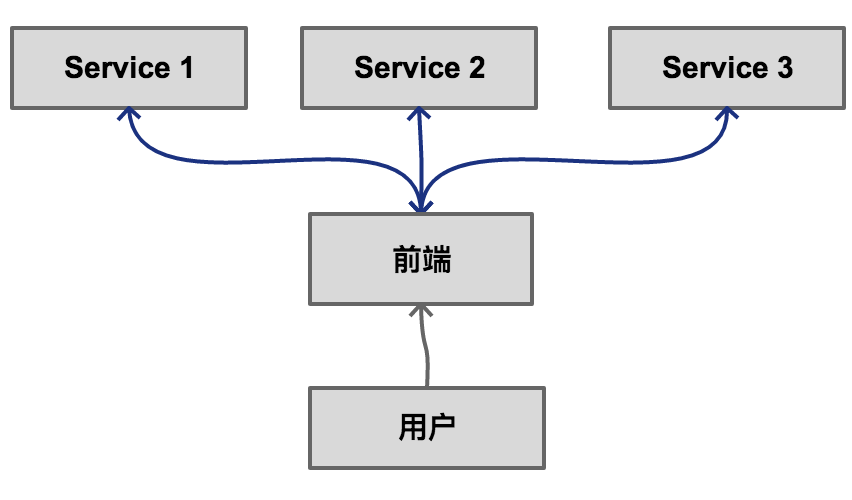
Traditional Monolithic Frontend
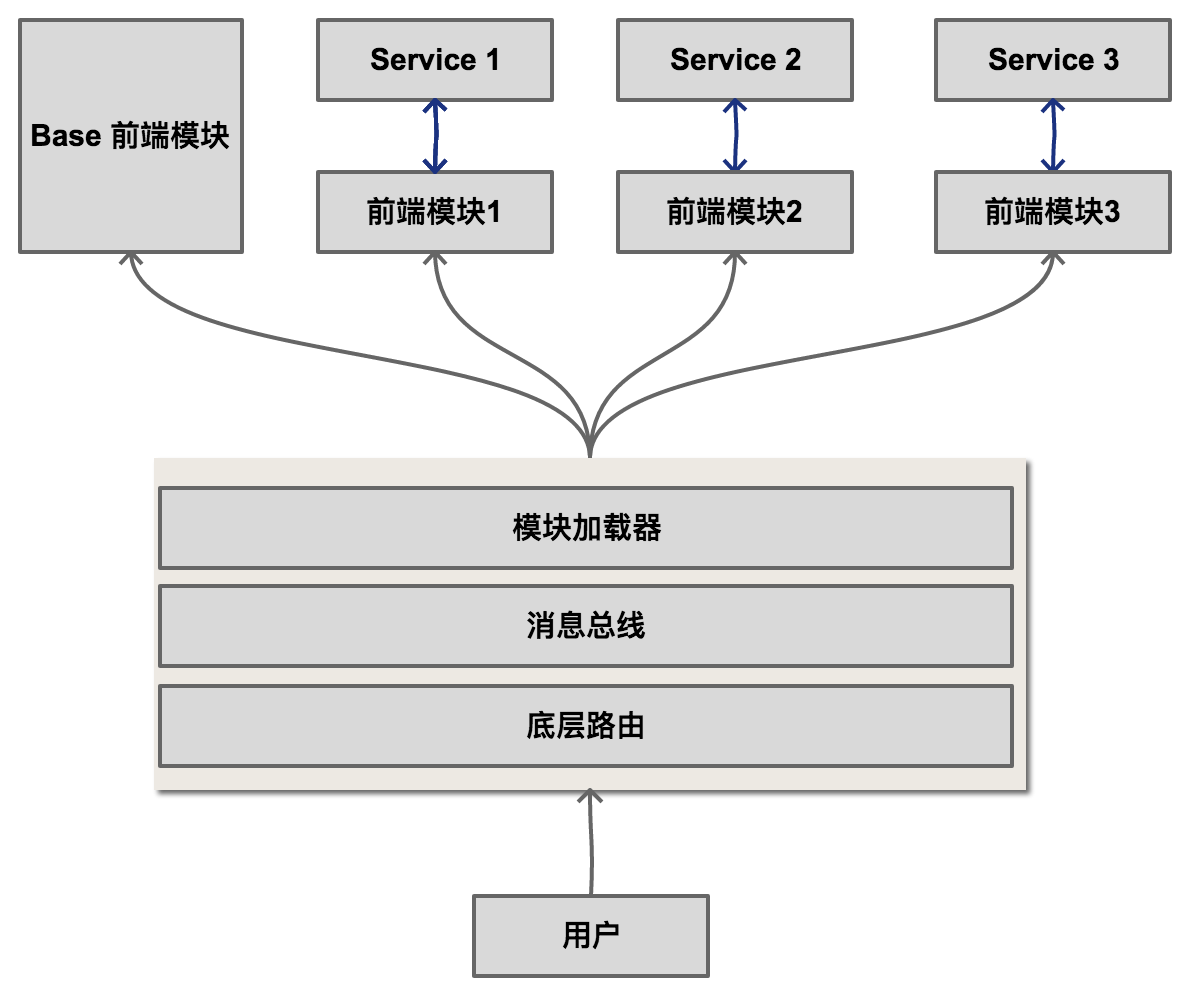
Micro Frontend Architecture
Basic Usage of Single-SPA
1. Create an HTML file
<html>
  <body>
    <div id="root"></div>
    <script src="single-spa-config.js"></script>
  </body>
</html>
2. Create single-spa-config.js
import * as singleSpa from "single-spa";

const loadingFunction = () => import("./react/app.js");
const activityFunction = (location) => location.pathname.startsWith("/react");

singleSpa.registerApplication("react", loadingFunction, activityFunction);
singleSpa.start();
Wrapping a React Application
Modify the React entry file to integrate with Single-SPA:
import React from 'react'
import ReactDOM from 'react-dom'
import singleSpaReact from 'single-spa-react'
import RootComponent from './root.component'

if (process.env.NODE_ENV === 'development') {
  ReactDOM.render(<RootComponent />, document.getElementById('root'))
}

const reactLifecycles = singleSpaReact({
  React,
  ReactDOM,
  rootComponent: RootComponent
  domElementGetter: () => document.getElementById('root')
})

export const bootstrap = [reactLifecycles.bootstrap]
export const mount = [reactLifecycles.mount]
export const unmount = [reactLifecycles.unmount]
When the browser URL prefix contains
/react, the application will render. All routes in this React app must be prefixed with/react.
Related Articles
- Micro Frontend Solution 1 - Thinking
- Micro Frontend Solution 2 - Single-SPA
- Micro Frontend Solution 3 - Module Loader
- Micro Frontend Solution 4 - Message Bus
- Micro Frontend Solution 5 - Route Distribution
- Micro Frontend Solution 6 - Build and Deploy
- Micro Frontend Solution 7 - Static Data Sharing
- Micro Frontend Solution 8 - Secondary Build
Demo
- Micro Frontend Demo
- Micro Frontend Module Loader
- Micro Frontend Base App Source
- Micro Frontend Submodule Demo Source